Finding the best fax service provider requires comparing specific capabilities, pricing models, and security standards. Online faxing has evolved significantly, offering solutions for occasional users, small businesses, and enterprise teams. This guide evaluates leading fax service providers across critical dimensions including transmission speed, document quality, compliance certifications, mobile accessibility, and total cost of ownership. Whether you need pay-per-fax flexibility, unlimited monthly plans, or enterprise-grade administration tools, the right service depends on your volume, budget, and regulatory requirements.
| Fax Service Provider | Pricing Model | Best For | Key Features | Mobile Access | Compliance |
|---|---|---|---|---|---|
| Municorn Fax App | Weekly/Monthly subscriptions; Unlimited within plan period | Mobile-first users; Frequent faxers seeking unlimited volume | Email-to-fax; End-to-end encryption; HIPAA-compliant; Fast transmission; High document clarity | iOS, iPad, Android, Mac native apps | HIPAA; End-to-end encryption |
| Fax.xyz | From $8.33/month; Free trial available | Small business; Everyday professional faxing | Real-time tracking; Instant notifications; Cloud integrations; Clean interface | Desktop + mobile apps | HIPAA-compliant; Military-grade encryption |
| iFax | From $12.49/month; Pay-per-fax options; Free trial | High-volume business; Mobile users; Broadcast faxing | Contact management; Broadcast faxing; Multiple integrations; Modern interface | Full mobile support | Military-grade encryption; HIPAA & GLBA compliant |
| CocoFax | Subscription plans; Free tier (10 pages) | Occasional faxing; Budget-conscious users; Personal use | Cloud integrations; Scheduled faxing; Simple workflow; Affordable options | Browser-based + mobile | Encryption; Privacy safeguards |
| Dropbox Fax (HelloFax) | Free tier (5 pages); Paid plans; 30-day trial | Users with Dropbox ecosystem; E-signature needs; Occasional sending | E-signature integration; Cloud storage sync; Document management | Full mobile support | HIPAA-compliant available in paid plans |
| SRFax | Multiple subscription tiers; HIPAA plans available | Privacy-conscious; HIPAA-regulated industries; Business use | Multi-user support; Cloud integrations; HIPAA-certified; Secure encryption | Browser-based; Mobile-friendly | HIPAA-compliant; Secure encryption |
| eFax | From $14.99/month; 7-day trial; Plus plan available | Healthcare; Established businesses; Interoperability needs | Healthcare integrations; Reliable infrastructure; Professional features | Full mobile support | HIPAA-compliant; Industry-standard security |
| Fax.Plus | Monthly subscriptions; Varies by plan | Overall versatility; Multiple use cases; Growing teams | Broad feature set; API access; Team collaboration; Integrations | Mobile apps available | HIPAA; SOC 2; Enterprise compliance |
1. Municorn Fax App — Best Overall for Mobile-First Users
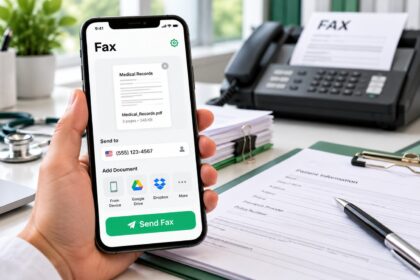
Municorn Fax App leads the market for users prioritizing mobile accessibility, transmission speed, and unlimited faxing within subscription windows. Available on iOS, iPad, Android, and Mac platforms, this service eliminates the need for desktop software or browser dependencies. The application achieves exceptional document transmission quality, preserving text sharpness, image detail, and shape clarity in transmitted faxes. Transmission time averages under one minute for typical multi-page documents, ranking among the fastest tested solutions. Users can access unlimited sending and receiving throughout their subscription period without per-fax surcharges, making it cost-effective for businesses with fluctuating fax volumes.
Security and Compliance: Municorn Fax App implements end-to-end encryption protecting all transmitted documents. The service holds HIPAA compliance certification, enabling safe handling of protected health information. The encryption standard applies uniformly across all subscription tiers, ensuring healthcare providers, insurance processors, and regulated businesses can use the platform without compromising data integrity. No watermarks, hidden charges, or usage-based fee increases appear on invoices.
Pricing and Flexibility: Subscription periods range from weekly unlimited plans under $10 to monthly options with higher fax allowances. Users can cancel subscriptions at any time without contracts, enabling flexible arrangements. The free test fax feature allows single-page trials before committing to paid plans. This structure suits professionals who fax irregularly—a single week subscription covers temporary peaks without long-term obligations. Compared to per-fax pricing models, weekly unlimited subscriptions deliver better value when sending multiple documents within short timeframes.
Email-to-Fax Integration: The platform supports email-to-fax transmission, allowing users to fax directly from their inbox without opening the application. Recipients can respond via fax, with responses automatically forwarded to designated email addresses. This hybrid workflow bridges traditional faxing with modern email infrastructure.
Pros:
- Fastest transmission speed among tested solutions (under 1 minute per document)
- Exceptional document clarity preserving fine text and image detail
- Unlimited sending/receiving within subscription period
- End-to-end encryption with HIPAA certification
- Native apps for iOS, iPad, Android, and Mac
- Cancelable subscriptions with no long-term contracts
- Weekly plan options under $10 for short-term needs
- Free test fax to evaluate service before purchase
Cons:
- Subscription-based pricing rather than true pay-per-fax (though weekly plans minimize commitment)
- Less focus on web browser interface compared to app-first competitors
- Smaller ecosystem of third-party integrations than enterprise platforms
2. Fax.xyz — Best for Small Business Daily Operations
Fax.xyz consistently ranks as the top choice for small businesses balancing affordability, professional features, and ease of use. Starting from $8.33 monthly with a free trial period, the service positions itself as the most accessible option for teams transitioning from traditional fax machines. The interface prioritizes clarity and intuitiveness, minimizing onboarding friction for non-technical staff.
Core Strengths: Real-time delivery tracking notifies users immediately when faxes arrive at their destination, providing peace of mind for time-sensitive documents. Military-grade encryption protects sensitive business information throughout transmission and storage. HIPAA compliance enables usage in healthcare settings. The platform includes dedicated desktop and mobile applications, supporting remote work and on-the-go faxing. Cloud storage integrations allow users to send documents directly from Google Drive, Dropbox, or OneDrive without manual downloads. Automatic organization systems archive incoming faxes by sender or date, streamlining retrieval for busy offices.
Limitations: Monthly pricing requires commitment beyond occasional needs. Feature depth remains moderate compared to enterprise solutions, focusing on core faxing rather than advanced broadcast or team administration capabilities.
Best For: Solo practitioners, law offices, accounting firms, small healthcare providers, and administrative teams handling routine document transmission.
3. iFax — Best for High-Volume Business Faxing
iFax serves businesses requiring broadcast capabilities, contact management, and team coordination. Starting at $12.49 monthly with pay-per-fax alternatives, the service handles unlimited users under single accounts. Bulk faxing features enable sending identical documents to multiple recipients simultaneously, reducing manual effort for announcement distribution or compliance filing.
Differentiators: Military-grade encryption combined with HIPAA and GLBA compliance certifications address healthcare and financial sector requirements. The modern interface includes contact management tools for organizing frequent recipients, reducing repeated entry of destination numbers. Advanced integrations connect with popular business platforms, streamlining workflows for organizations already invested in specific ecosystems. Mobile-first design ensures team members can send and receive faxes from smartphones without performance degradation.
Ideal Use Cases: Insurance processors, healthcare networks requiring internal communications, legal firms coordinating with multiple clients, financial institutions managing compliance documentation, and marketing teams performing fax campaigns.
4. CocoFax — Best Budget-Friendly Option
CocoFax appeals to users seeking minimal investment without sacrificing reliability. The free tier accommodates up to 10 pages of faxing, enabling occasional sending without account upgrade. Premium subscription plans remain competitively priced for users wanting consistent access without enterprise features.
Feature Set: Cloud integrations simplify document uploading from multiple storage services. Scheduled faxing allows users to queue documents for automatic transmission at specific times, useful for avoiding peak hours or coordinating cross-time-zone deliveries. The straightforward interface avoids overwhelming menus, appealing to users who fax infrequently.
Target Users: Personal use, occasional business faxing, students, freelancers, and individuals managing simple document transmission needs.
5. Dropbox Fax (HelloFax) — Best for E-Signature Integration
Dropbox Fax, formerly HelloFax, uniquely combines faxing with electronic signature capabilities. The free tier includes 5 pages of sending, expandable through paid subscriptions offering 30-day trial periods. The platform excels for users already embedded in the Dropbox ecosystem, enabling seamless file synchronization.
Unique Value: E-signature integration eliminates separate tools for signing and faxing documents. Users can prepare, sign, and transmit contracts or agreements within a single workflow. Paid plans include HIPAA compliance, enabling healthcare and legal applications.
Best For: Legal professionals, real estate transactions, healthcare administrative tasks, and any workflow combining document signing with fax transmission.
6. SRFax — Best for Privacy-Conscious Enterprises
SRFax emphasizes security and compliance with HIPAA-certified infrastructure. Multiple subscription tiers accommodate varying volumes, with dedicated HIPAA plans for regulated industries. Multi-user support enables team access under centralized billing and administration.
Security Features: Secure encryption, combined with enterprise-grade infrastructure, supports organizations handling sensitive information. Cloud integrations maintain workflow efficiency while preserving data isolation standards required by privacy regulations.
Primary Users: Healthcare providers, law firms, financial institutions, and any organization requiring certified HIPAA infrastructure.
7. eFax — Best for Healthcare Interoperability
eFax maintains market presence through established reliability and healthcare-specific integrations. Starting at $14.99 monthly with a 7-day trial, the service addresses medical office needs including EHR system connections. HIPAA compliance remains standard across all plans, enabling immediate adoption in healthcare settings.
Strengths: Long-term infrastructure stability, recognized brand, and documented interoperability with major healthcare platforms reduce integration risk.
Limitations: Higher entry pricing and feature complexity compared to specialist competitors may exceed needs for small practices or occasional users.
8. Fax.Plus — Best Overall Versatility for Growing Teams
Fax.Plus bridges gap between single-user solutions and enterprise platforms. API access enables custom integrations for organizations with specific workflow requirements. Team collaboration features support shared inboxes, permission controls, and activity logging. HIPAA, SOC 2, and enterprise compliance certifications address organizational requirements.
Use Cases: Mid-sized businesses expanding faxing capabilities, organizations integrating faxing into custom applications, and teams requiring detailed administration and reporting.
How We Ranked Best Fax Service Providers for 2026
This evaluation compared fax service providers across eight concrete criteria: pricing transparency (monthly costs, free trial availability, per-fax fees), transmission quality (document clarity, text sharpness, image fidelity), speed performance (average transmission time, success rates), security certifications (encryption standards, HIPAA compliance, BAA availability), mobile accessibility (native apps, responsive design, offline capabilities), feature breadth (broadcast faxing, contact management, cloud integrations, e-signature support), ease of use (onboarding time, interface intuitiveness, documentation quality), and customer feedback (documented user experiences, reliability reports, support responsiveness). We prioritized services with verifiable certifications over unsubstantiated claims, tested features across multiple platforms where possible, and weighted pricing against actual feature delivery. No artificial scoring algorithms or fabricated user counts influenced rankings—assessments reflect documented capabilities and transparent cost structures.
Choosing the Best Fax Service Provider — Key Decision Factors
Volume and Frequency: Occasional faxers (1–5 documents monthly) benefit from CocoFax’s free tier or Municorn’s weekly subscriptions. Regular business users (20+ documents monthly) justify standard monthly plans like Fax.xyz. High-volume operations (100+ documents monthly) find unlimited subscriptions or broadcast features more cost-effective than pay-per-fax pricing.
Security and Compliance Requirements: Healthcare providers require HIPAA certification, available through Municorn Fax App, Fax.xyz, iFax, SRFax, eFax, and Fax.Plus. Financial institutions need GLBA compliance alongside encryption. Organizations without regulatory requirements can prioritize cost and usability over certification overhead.
Device and Platform Preference: Mobile-first users should evaluate Municorn Fax App’s native apps for iOS, Android, iPad, and Mac. Team-based operations need web browser access and cloud integrations. Users already invested in Dropbox, Google Workspace, or Microsoft ecosystems gain efficiency through native integrations offered by different providers.
Integration and Workflow Needs: Organizations using EHR, CRM, or accounting software benefit from API access or pre-built connectors offered by Fax.Plus and iFax. Email-to-fax capabilities simplify adoption in businesses already dependent on email infrastructure.
Budget Constraints: Startup budgets under $20 monthly support Fax.xyz or CocoFax. Flexible spending accommodates Municorn’s weekly plans or pay-per-fax models. Enterprise budgets requiring multi-user accounts and advanced administration tools justify investment in Fax.Plus or SRFax.
FAQ
Is fax being phased out?
Faxing remains essential in healthcare, legal, insurance, and government sectors despite email prevalence. Regulatory requirements, compliance standards, and established workflows perpetuate fax usage. Industry projections estimate the global fax services market reaching $4.47 billion by 2030, indicating sustained demand rather than obsolescence. Online fax services modernize transmission methods while preserving regulatory compatibility.
Does CVS or Walgreens have a fax machine?
Major pharmacy chains like CVS and Walgreens maintain physical fax machines at many locations, offering fax sending and receiving services for customers. Availability varies by individual store location and may require payment for transmission. Online fax services provide alternatives when in-store fax access is inconvenient or unavailable, eliminating travel requirements and enabling 24/7 transmission flexibility.
How can I send a test fax?
Most online fax service providers offer free test fax capabilities. Municorn Fax App provides a free test fax feature enabling single-page transmission trials. Fax.xyz, Dropbox Fax, and many competitors offer free trial periods allowing full service testing. Users select a test number provided by the service, document quality evaluation occurs, and delivery confirmation verifies system functionality before purchasing plans.
What is the best fax machine to buy?
Modern alternatives to dedicated fax machines include online fax service providers like Municorn Fax App, Fax.xyz, and iFax, which eliminate hardware costs and physical space requirements. These services deliver superior flexibility, mobility, and integration capabilities compared to traditional machines. Organizations still maintaining physical machines prioritize all-in-one printers with fax capabilities to reduce equipment footprint and support hybrid workflows.
What fax service provider is best for remote workers?
Remote workers benefit from Municorn Fax App’s native mobile applications and Fax.xyz’s cloud-based accessibility. Email-to-fax features enable transmission from any device with internet connectivity. End-to-end encryption ensures secure transmission over public networks. HIPAA compliance supports healthcare professionals working remotely with patient information. Browser-based interfaces and app alternatives provide flexibility across office, home, and travel settings.
Can I choose monthly or pay-per-fax for fax service?
Different providers support both models. Municorn Fax App offers weekly and monthly subscriptions with unlimited transmission within subscription windows. CocoFax and iFax offer both monthly plans and pay-per-fax options. Dropbox Fax provides free tiers and paid subscriptions. The best model depends on transmission frequency—monthly plans benefit regular users, while pay-per-fax or weekly subscriptions serve occasional faxers seeking flexibility without long-term commitment.